VM Notes for pfSense / OPNsense
·2 min read·BIGWONG Studio
Network
In ESXi, PVE, or Hyper-V, pfSense/OPNsense can suffer from odd network issues if some VM settings are overlooked.
Minimum hardware
VM installs need a bit more than bare metal. Official recommendations:
- Memory: at least 1 GB
- Disk: at least 8 GB
Disable NIC hardware offload
Due to FreeBSD drivers, hardware offload can cause the firewall to block normal traffic.
pfSense
- Go to System > Advanced > Networking
- Under Networking Interfaces, enable Disable hardware checksum offload
- Click Save
- Reboot pfSense

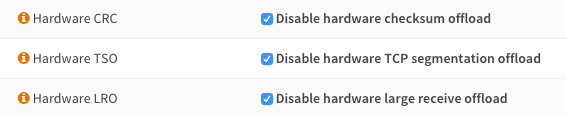
OPNsense
- Go to Interfaces > Settings
- Configure as shown
ESXi-specific notes
- Follow the official FreeBSD install guide for ESXi: VMware GOSIG
- Use
e1000for best compatibility (especially with QoS) - Use
vmxfor best performance - If disk issues occur, try switching disk mode to
IDE - Install Open-VM-Tools (pfSense: System > Packages)
- Install os-vmware (OPNsense: System > Firmware > Plugins)
Installing Open-VM-Tools or os-vmware improves network and disk performance. They are required if you want to reboot or shutdown the VM from the web UI.
PVE (KVM) notes
i440FX chipsetworks wellQ35 chipsetis not supported due to FreeBSD + KVM driver issues